The AllScan UCI180 USB Communications Interface is a professional-grade USB interface that connects a radio, mic, speaker and USB host device, with extensive flexibility. The UCI180 is a simplified version of the UCI200, that has been specifically optimized for Alinco DR-735 mobile radios.
Schematic (Main Board) /
Schematic (Analog Board)
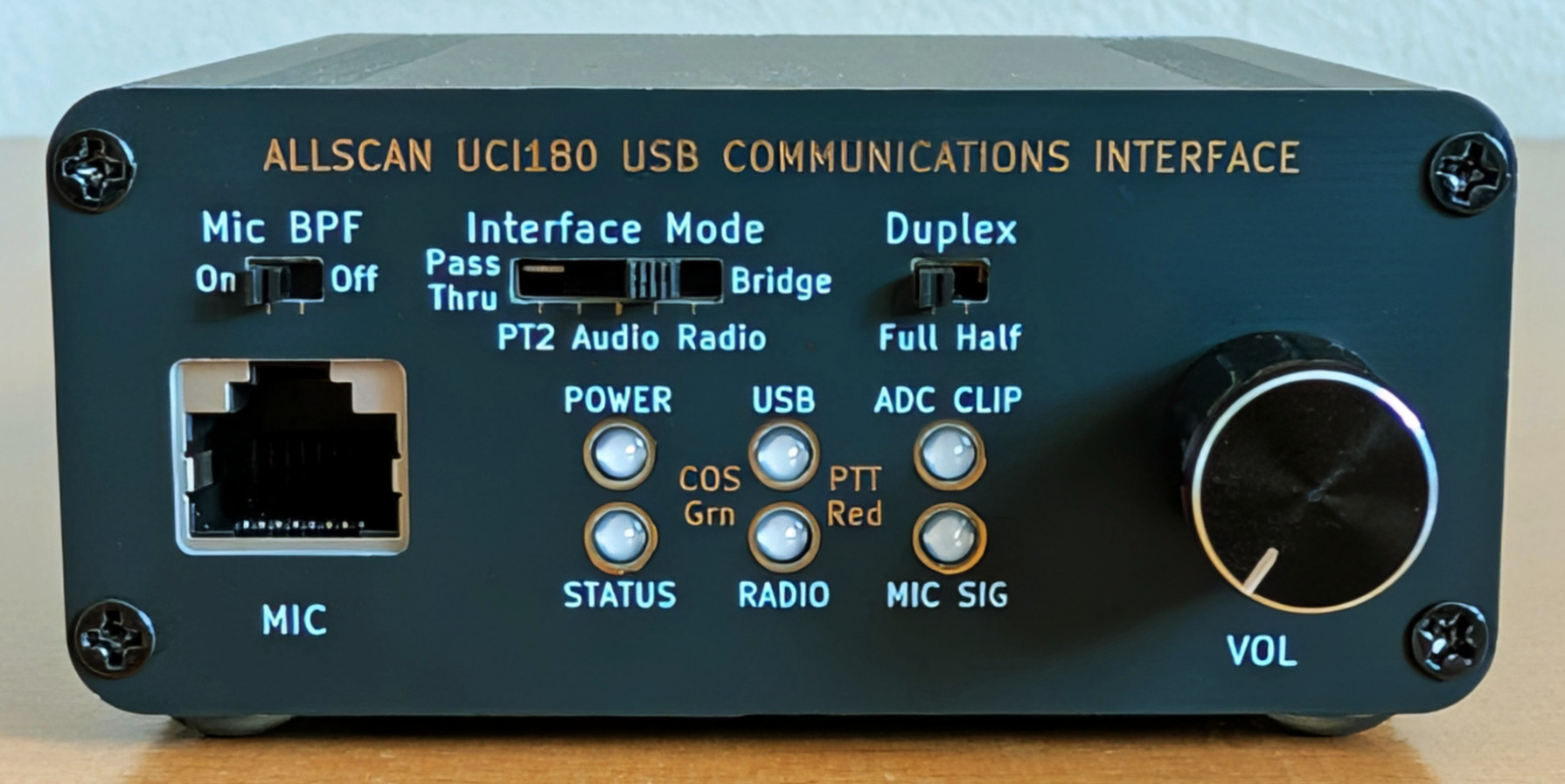
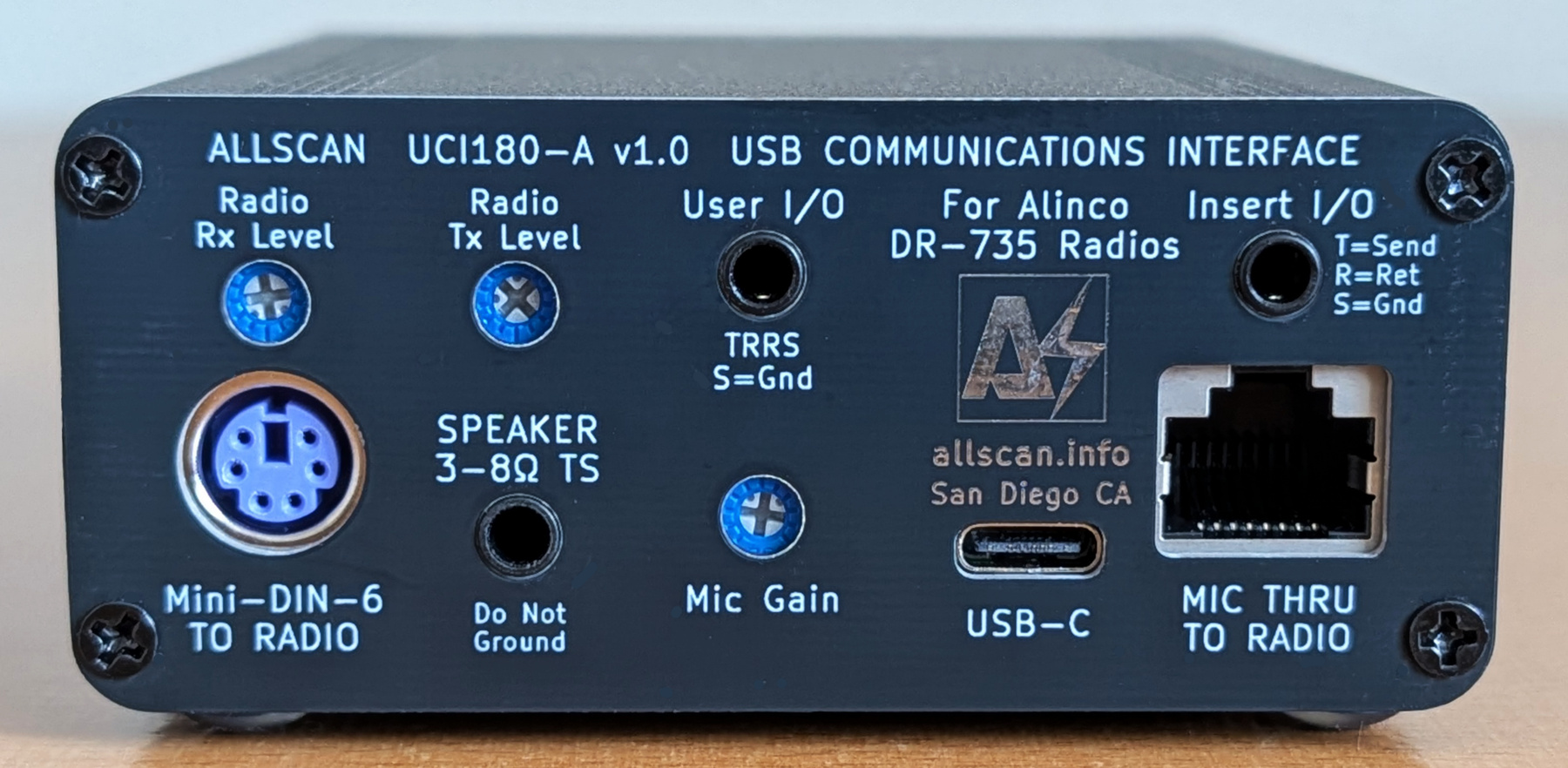
Enclosure size: 3.5"W x 1.5"H x 3.9"D (88x38x100mm). Click images to enlarge
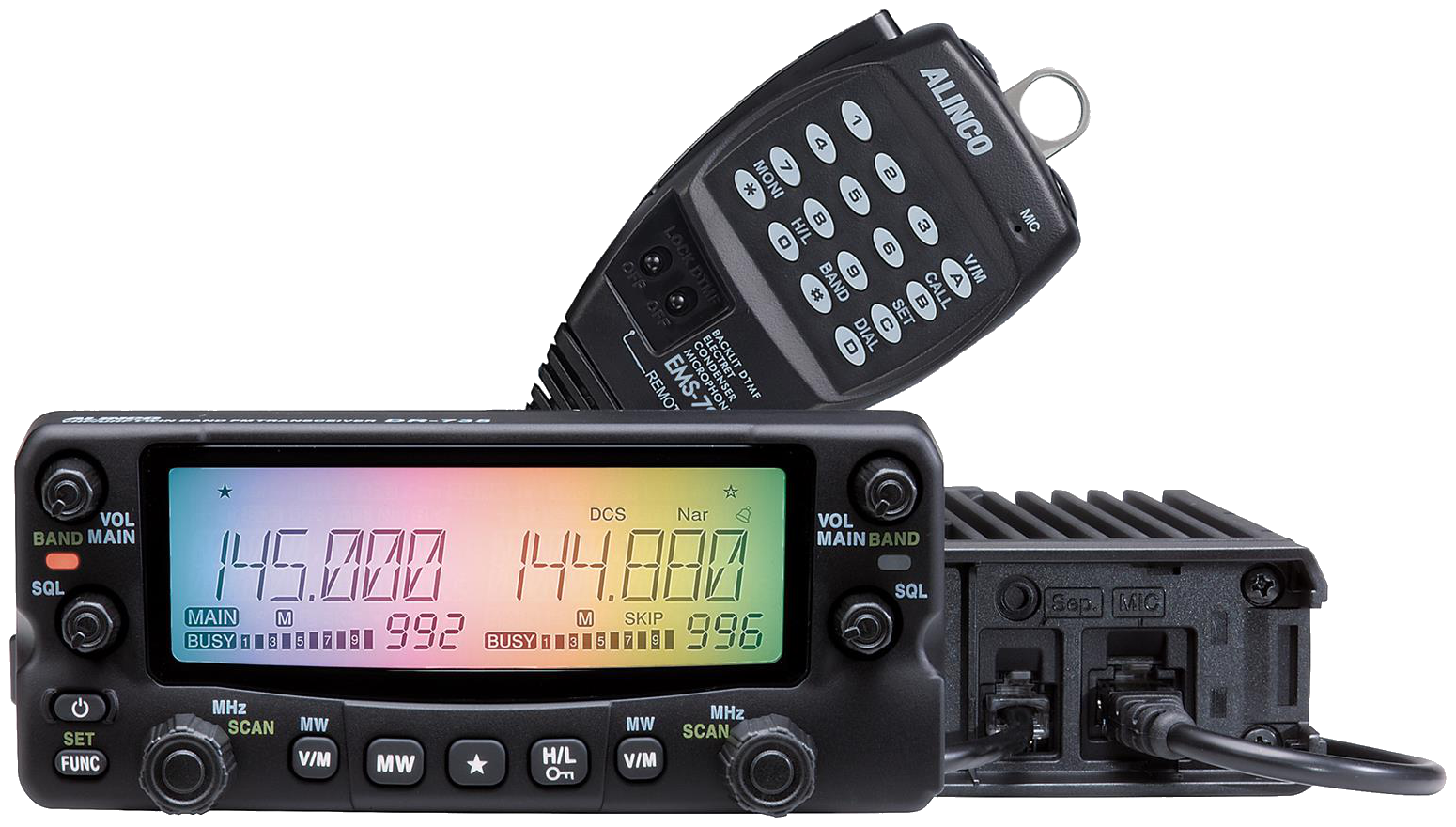 The UCI200 was the first multi-mode interface available that supports using a mobile radio and its mic in Pass-thru, Radio-less, Radio, and Bridge modes, and connects to both the Mini-DIN-6 jack and Mic jack. Alinco DR-735's are the only known current production mobile radio that support cross-band full-duplex, have a Mini-DIN-6 "data" jack, include a mic with built-in DTMF encoder, are well-made and reasonably priced. The DR-735 and many other mobiles do not support simultaneous use of both bands on the data jack however, and thus did not support simple plug & play use in cross-band full-duplex nodes. The UCI180 leverages the mic jack to properly support cross-band full-duplex on the DR-735 and differs from the UCI200 in that Tx audio is routed to the Mic jack only. The DR-735 does not support 9600 Tx audio thus use of the mic jack for all Tx audio does not limit its functionality, and allowed significant simplifications in the UCI180 design as separate 1200/9600 Rx audio paths and preemphasis/deemphasis support are not needed.
Introduction
Prior to the UCI200 and UCI180 there were 2 separate classes of interfaces used with AllStar and other ROIP apps – either USB Radio Interfaces, or Radio-less interfaces that connect to a mic and speaker. Each has its advantages and each has very different design requirements. Supporting both of these modes in one device provides major advantages – without which some major limitations existed in how nodes could be used. As an example let's look at a common set of use cases – using a mobile radio in a way that supports:
- Normal operation with local repeaters
- Connection to AllStar (or other ROIP network) such that an HT can be used to access the network through the mobile radio
- Connecting directly to AllStar with the radio's mic and a speaker, such that when preferred the mic can be used instead of needing to use an HT to transmit to a mobile radio that's only a few feet away
- Talking on local RF while also being connected to AllStar eg. so you can use the mic and speaker to talk on AllStar and RF, while other hams at a nearby park bench, hamfest, club meeting or community service event can join in on HTs
During a Ham Radio Workbench podcast I was on in Dec. '25, Mark N6MTS shared an all too common example of numerous RF transceivers and connections being needed just to get an audio signal to travel a few feet. When on a roadtrip and wanting to talk on DMR but being out of range of DMR repeaters most of the time he resorted to using a cellphone to provide WiFi to a DMR hotspot which in turn provided an RF link to an HT. Thus 3 separate RF transceivers needed to be used (cellular data, WiFi, and VHF/UHF), all inside of a vehicle. Now add the power and interconnect cables, battery chargers, etc. and the result is a hodgepodge of devices, cabling and RF signals in the vehicle.
To avoid such a situation, a radio-less interface such as the UCI80 and a K1 speaker-mic can be used, which is a far simpler and more compact solution. A radio-less node is not as flexible as a radio node though, for example if when on a road-trip you wanted to leave the node in the car and go for a walk with an HT, a separate radio node in the vehicle would be needed.
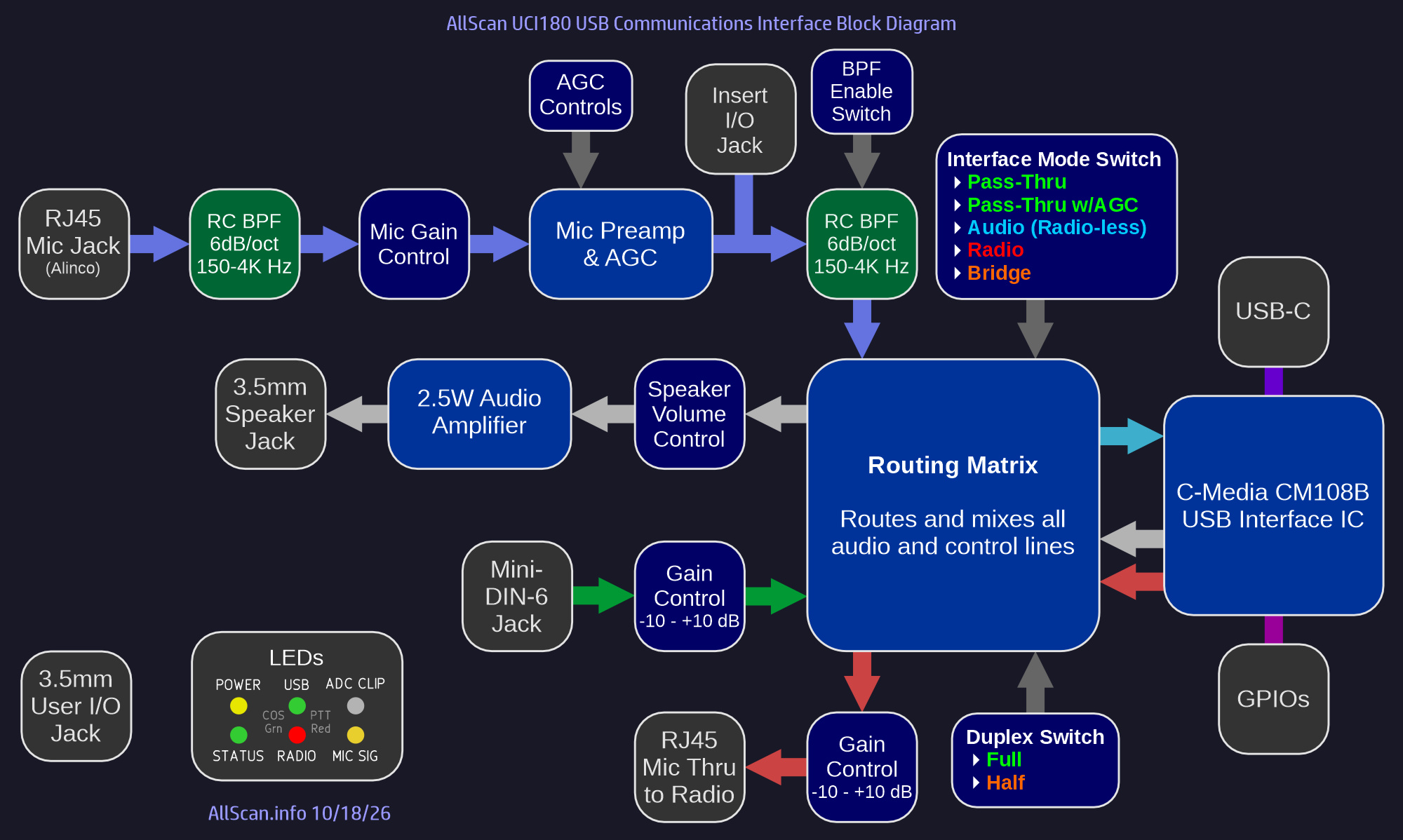
The UCI180 not only supports Radio and Radio-less interface modes, but also supports 2 Pass-Thru modes enabling the mic to be directly connected to the radio, and supports a Bridge mode allowing the radio, the mic and speaker to be simultaneously connected to the USB host.
With the UCI180 the 4 use cases mentioned above are all easily supported with a single front-panel slide switch. Before the UCI180, to support those uses on radios such as the DR-735T would have required manually unplugging the mic and moving it back and forth between the radio and other devices and/or having multiple interfaces and/or mics, radios, cables, antennas, switchboxes, etc. The UCI180 also passes through the mic button-press serial data line to the Mic Thru jack such that the mic keypad functions can be used as normal with the radio to enter frequencies, select channels, etc.
The UCI180 supports 2 Pass-Thru modes, PT1 which directly passes the mic lines to the 2nd RJ45 and to the radio, and PT2 which passes the mic audio through the UCI's internal mic preamp, AGC and bandpass filter circuitry.
Features
- Multi-Mode USB Interface supporting multiple audio paths (USB, Mic & Speaker, Radio) and the following Interface Modes:
1. Pass-thru 1: Mic in direct to Mic Thru (no internal audio processing), Radio Rx → Speaker out
2. Pass-thru 2: Mic in → Mic Thru (with AGC & filtering), Radio Rx → Speaker out
3. Audio (Radio-less): Mic in → USB out, USB in → Speaker out
4. Radio: Radio Rx → USB out, USB in → Radio Tx
5. Bridge: Above connections (2)-(4) are simultaneously enabled
- Supports the following Duplex Modes:
1. Full: Normal operation supporting full-duplex ASL configuration
2. Half: Prevents the radio from being keyed up by ASL when COS is asserted. This supports use of the UCI180 and radio on simplex channels and local [not cross-band] repeaters, without needing to reconfigure ASL for half-duplex
- 6dB/octave bandpass filter ahead of the AGC mic preamp, and switchable 6dB/oct Mic BPF after the AGC minimize AGC gain-pumping, ADC clipping, thumps, clicks and other background noise. These filters have a smooth response curve supporting extended frequency response for other audio applications
- Supports AllStarLink, DVSwitch, HamVOIP, EchoLink, and works as a standard audio interface in Windows, Mac & Linux. Includes a C-Media CM108B IC, USB-C jack, Analog Devices MAX9814 Mic Preamp & AGC, and internal header pads for all Radio & CM108 I/Os
- RFI filtering on all I/Os, optimized PCB layout with separate analog and digital power supplies and ground planes ensures extremely low noise and clear audio. Extruded aluminum enclosure maximizes durability and EMI/RFI resistance. Integrated audio isolation transformer for the Mic Thru audio prevents EMI / noise / ground loop issues when the radio and MiniPC / RPi / SBC are powered from the same 12V power supply
- 6 tri-color status LEDs show status of Power, Mic signal, ADC Clip, and PTT & COS for each audio path. The signal and clip LEDs make it quick and easy to set mic input levels and minimize any risk of ADC clipping
- Mic Gain Adjust control provides a 30dB gain adjustment range supporting a wide range of communications microphones and dynamic mics. An internal 10Ω–0.5mF filter on the analog power supply ensures the lowest possible noise, particularly with older preamplified mics that do not have good supply voltage filtering or mics that combine audio and power on one line.
- 3.5mm TS Speaker jack, integrated 2.5W Class-AB audio amplifier
- Insert I/O Jack supports the use of external audio processors, mixers, and other audio systems. 3.5mm Tip=Send (from AGC out), Ring=Return (to ADC in), Sleeve=Ground
- Supports mic models including the Alinco EMS-79 as well as Yaesu RJ45 mics, or any other electret or preamplified mic than can run from a 5V supply.
- Supports full and half duplex operation with no limitations. USB audio is not dependent on PTT/COS; audio between mic, speaker and radio are gated by PTT/COS lines
Overview
The UCI180's primary application is for use with AllStarLink but it can also be used with any other PC / smartphone / embedded / VOIP / ROIP application that would benefit from a high-quality interface to amateur and commercial radios, communications microphones and speakers. It works with any Mini PC or RPi / SBC, is compact and portable, and delivers excellent audio quality and dynamics. A MiniPC or RPi can be loaded with ASL3 and set up in as little as an hour. I do not recommend using anything with less than 1GB RAM or 8GB eMMC/SSD.
The UCI180 can be used with a variety of PTT communications / ROIP apps, if they support CM1xx COS (ie. CM1xx IC VolDn or VolUp HID input) from the UCI. Windows apps such as EchoLink support this using the SysOp URI interface option. Other apps such as Zello may only support PTT/COS through serial port handshaking lines, which can be supported relatively easily (as is done in the URI160) - contact me for details. AllScan URIs & UCIs are fully compatible with the EchoLink Windows app, in SysOp mode with RX Ctrl Carrier Detect set to "URI" and "Invert Sense" Checkbox checked. Note that a new version of EchoLink was made available in Oct. 2024 that supports the CM108B IC.
All AllScan products are warranted against defects in materials and workmanship for 1 year from the date of original sale. Note however that the warranty does not cover damage to 3.5mm, RJ45 or USB jacks.
For more information on how to set up AllStar see my How-To Guides.
Recommended Radios
The UCI180 is intended for use with Alinco DR-735 radios, but should also work with other Alinco DR-series mobile radio models. AllScan is an authorized Alinco dealer and the UCI180 is also available in packages with a new DR-735T, and optionally also with a fully configured MiniPC / RPi or other SBC running ASL3.
Internal Slide Switch Settings
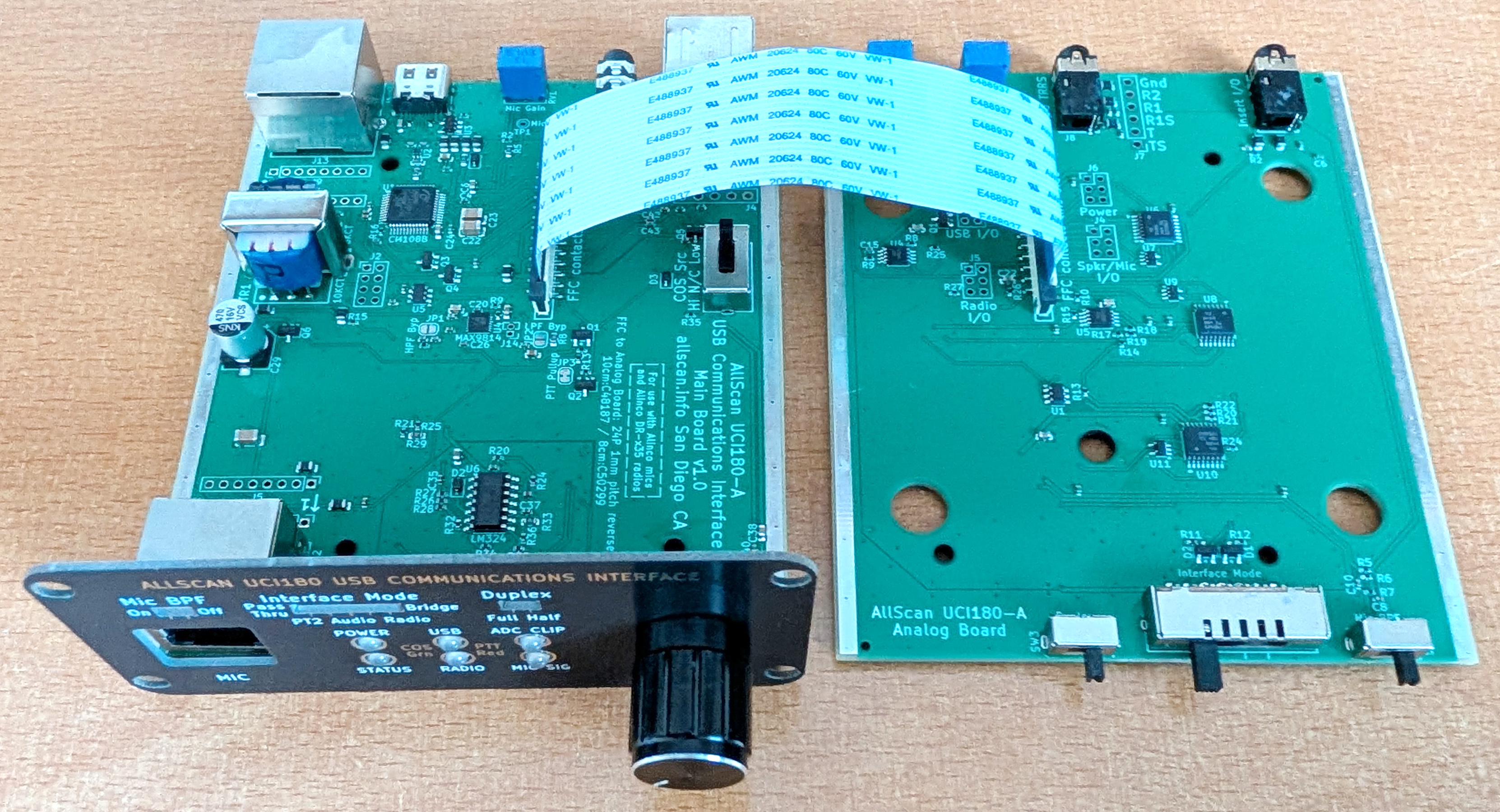
Shown below are the UCI180 internal PC boards. There is only one internal user adjustable control - a slide switch for configuring if the COS input is active-high, active-low, or not connected. This will be set to the active-high setting when shipped, supporting the DR-735.
Audio Processing
The mic audio processing features of the UCI120 are discussed in detail on the UCI120 Product Page. To summarize, the UCI180 mic audio processing ensures that mic audio will have equal or better audio quality and dynamics as even the best ham mobile radio equipment or repeater systems.
The Mic Gain Adjust knob should generally be set 50% clockwise (-6dB), and any audio level adjustments then made in the ASL rxmix setting and in the back panel Radio Tx Level adjust trim pot. It may be necessary to fine tune all 3 of these level adjustments to get the best balance of audio levels from the mic into the USB host and to the radio, and from the USB host to the radio.
Mic Options
The UCI180 can support a wide range of microphones and headsets, as well as line level audio sources through the Insert I/O jack. The Alinco EMS-79 (supplied with Alinco DR-735's) has a built-in DTMF tone encoder, supporting DTMF commands to AllStar and through the radio to local repeaters. Therefore the EMS-79 is highly recommended with the UCI180. The mics supplied with many other mobile radios do not have an actual DTMF encoder, ie. they send serial data to the radio and the radio then generates DTMF audio. As a result these mics will not be able to send DTMF tones to the USB host application. DTMF commands can still be sent to the host app eg. ASL from an HT with the UCI in Radio or Bridge mode, or from the AllScan, AllMon or Supermon web apps or similar smartphone apps, or via SSH and the Asterisk CLI, scripts or tune menu commands.
Speaker Options
Any 3 - 8 Ω speaker should be fine but for the best audio quality a mobile speaker from Icom, Kenwood or Yaesu such as an SP-35 or MLS-100 are recommended which are around $30 or so. Or Heathkit, Motorola, Kenwood and many other vintage speakers often sound excellent and can be easily found for $25~$50.
The UCI180 speaker amp has plenty of volume for most environments, but for louder environments eg. driving on the highway with the windows down you may need something a bit louder. The UCI180 will output 2.5W @ 4Ω and 1.5W @ 8Ω, and the 3.5mm User I/O jack can be used to go into any boombox, car or home stereo Aux In jack or powered speaker.
AllStarLink Setup Notes and Required Settings
ASL's USBRadio driver provides some useful features vs. SimpleUSB including wider filter bandwidth settings, but the SimpleUSB driver should be more than sufficient for the UCI180 and DR-735.
Level settings of 999 are recommended for both txmixaset and txmixbset to ensure the Volume knob and Radio Tx Level trimmers have the widest range of control, then rxmixerset should be set to around 500, with the UCI180 Mic Gain and Radio Rx Level controls used to then further adjust Rx audio levels.
Enable SimpleUSB channel driver using asl-menu, or by setting rxchannel = SimpleUSB/[Node#] under the [Node#] stanza in rpt.conf and load = chan_simpleusb.so in modules.conf. Also be sure to set duplex=3 in rpt.conf.
Make the below settings in simpleusb.conf:
rxboost = no
carrierfrom = usbinvert
ctcssfrom = no
deemphasis = no
plfilter = yes
preemphasis = no
clipledgpio = 1
legacyaudioscaling = no

[NODE#](node-main)
rxmixerset = 500  ; Adjust using tune menu so that Rx levels peak no higher than 5KHz
txmixaset = 999
txmixbset = 999
The UCI Duplex Switch should usually be set to Full, unless you are in Bridge mode and talking on simplex RF or to a local [not cross-band] repeater.
ASL3 Clip LED Support
The UCI180 supports the ASL3 ADC Clip Detect feature. To enable this be sure you are running ver. ≥3.0.5 and that you have the "clipledgpio = 1" line in simpleusb.conf/usbradio.conf. The ADC Clip Detect feature checks the raw ADC data stream for sequential clipped samples. If the Clip LED ever illuminates during normal use be sure to reduce the Mic Gain Adjust and/or Radio Rx level trimmers, or the ASL rxmix setting. AllStar audio levels should ideally have at least 3-6 dB of headroom between maximum audio levels and where clipping starts to occur.
General Setup Steps
I recommend the following steps to set up a UCI180, test each mode and calibrate the various audio level settings:
- Plug the mic into the front RJ45 jack, and plug a speaker into the Speaker jack. Set the Volume knob to about 20%.
- Set up a MiniPC/RPi with ASL3 as described above.
- Plug in the UCI, power on the MiniPC and confirm the Status LED is blinking, which indicates ASL is communicating with the UCI.
- Set the Interface Mode switch to Audio (ie. Radio-less mode). Key up the mic and confirm the Mic Sig LED lights up yellow (Red PTT + Green Mic Signal level) and that ASL then keys up (USB Green COS LED comes on) and you hear a courtesy tone after unkeying. Then enable parrot mode or connect to a parrot node (eg. 55553) and check that your mic audio sounds good.
- Configure the radio as described here. Connect a Mini-DIN-6 cable between the UCI and the radio. Connect an RJ45 cable between the UCI Mic Thru RJ45 and the radio's Mic In jack.
- Switch the Interface Mode to PT1 and confirm that the mic works as it should with the radio and you are able to use local repeaters and use the mic keypad to control the radio.
- Switch the Interface Mode to Radio, then talk into the mobile radio from an HT and confirm you are able to use AllStar on the HT. You will likely need to adjust the Rx and Tx Level trim pots on the back of the UCI until your Rx and Tx levels to and from the HT sound good. Be sure to watch the ADC Clip LED on the UCI and if it ever lights when talking into the node then reduce the Rx Level trimmers and/or reduce the rxmix setting in ASL. Then try changing channels on the HT and confirm the Rx level from the node is about the same as the audio levels from local repeaters. Or you can use a service monitor or SDR to check the deviation from the mobile radio.
- Once you have spent some time using the Radio-less and Radio modes and are comfortable that all I/O levels have been set optimally, you can then try Bridge mode which enables all audio paths. You can then talk into the mic or into an HT, and that audio will go into AllStar, and if parrot mode is enabled will then play back to the speaker and through the radio. Some further iterative adjustments to various levels may be required to get the optimal mix of levels for each audio source to each audio destination.
If you have any questions, feel free to email me at the email address shown on the main page, and let me know as much detail as possible about your setup, settings and steps followed.
Specifications
USB Audio IC
The CM108B USB audio controller/codec IC is a versatile and cost-effective USB audio solution providing CD-quality 16-bit 48Ksps audio (2 output channels and 1 input channel).
- The CM1xxB usable input range (supporting full ADC dynamic range) is -18 to 6 dBVrms, which corresponds to ASL rxmixerset values of 999 to 325, and IC mixer gain settings of 34 to 11 (1dB steps)
- CM1xxB ADC stated SNR is 90dB, DAC SNR is ≥93dB
- CM1xxB DAC ±3dB frequency response is 20–20K Hz
- CM1xxB ADC ±3dB frequency response is 100–20K Hz, but its response below 100Hz is usable (-6dB or so at 20Hz)
The UCI180 uses both the Left and Right audio outputs of the CM108B IC. The Left output is routed to the UCI180 Speaker output and the Right output is routed to the Mini-DIN-6 output.
RJ45 Mic In & Thru Jacks
Generally the UCI180 will be used with a mobile radio and the mic supplied with the radio will then be plugged into the front RJ45 Mic In jack on the UCI. The back Mic Thru jack then gets connected to the radio's Mic In jack with a short RJ45 cable. Any standard (not "crossover") RJ45 cable can be used, eg. Cat5/6/7/8, shielded/unshielded, etc.
Headset / Speaker-Mic Connections
Speaker-mics and many headsets have an electret mic element requiring a ~2 Volt bias voltage on the mic audio line. The 3.5mm User I/O jack can directly support an electret mic with bias voltage, PTT, and speaker audio output. Speaker mics designed for Kenwood/K1 HTs (3.5mm & 2.5mm jacks) will work great as they provide a standard PTT to Ground output. To connect a K1 speaker mic would require an adapter cable to go from K1 3.5mm & 2.5mm jacks to a 3.5mm TRRS or RJ45 plug.
Revision History / Schematic Notes
For schematics of earlier versions see the AllScan-Products GitHub repository. Note that the version number is shown on the PC Board. (The back panel version number refers to the top-level product assembly.)
Full-Duplex Notes
Be sure to read the Full-Duplex Communication Benefits section in my How-To Guides for important notes on the benefits of full-duplex on AllStar.
Conclusion
The UCI180 brings an new level of features and flexibility to the Alinco DR-735 and to AllStar and other ROIP apps. A thorough and uncompromising approach was taken in the UCI180 development, resulting in a flexible platform that can accommodate a wide range of applications. For more info see the Products page.